Record it. Send it.
Record your screen and camera, and send a link instead of booking a meeting. The link is ready before you stop recording.
Three steps. No meeting.
Record.
Screen, camera or both, right in the browser. Pause, rewind the last few seconds, or start over.
Share.
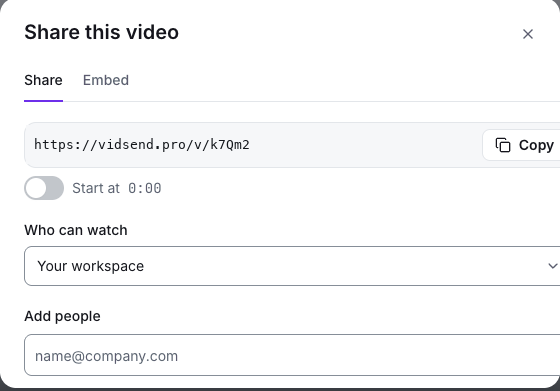
The link is copied before you stop. Choose who can watch: anyone with the link, your workspace, or only the people you add.
Get answers.
People comment at the exact moment, react, tick off tasks or reply with a video. You see who watched and how far they got.
Invite your team
 Priya just now0:07Can we move the import step before invites?Reply with videoAdd task
One link for every team.
Product and engineering
Bug reports with the details attached, PR walkthroughs and demos.
Sales and customers
Personal videos with a button to book a call, and knowing who watched and for how long.
Support and onboarding
Step-by-step guides, SOPs and training playlists that new people work through.
Managers and remote teams
Updates that replace a status meeting, watched when it suits each person.
Built for answers, not just views.
Every video can ask for something back. People reply at the moment that matters, so nobody has to describe where they were.
Replies pinned to the moment.
Priya just now0:07Can we move the import step before invites? Sam just nowAgreed, that's where people drop off.
 Mei replied with a video0:48
Tasks each viewer ticks off.
Pin a task to a moment. Every viewer gets their own list and you see who's done.
- Check the new invite email0:42
- Try the CSV import1:15
- Approve the empty-state copy2:03
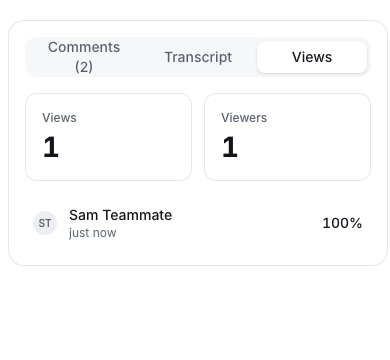
See who watched and how far.
Views, unique viewers, average completion and button clicks for every video.
Buttons that ask for the next step.
Pin a button to the video, show it at the end, or put it underneath. Book a call, read the doc, approve. Set one default for all your videos.
Bug reports developers want.
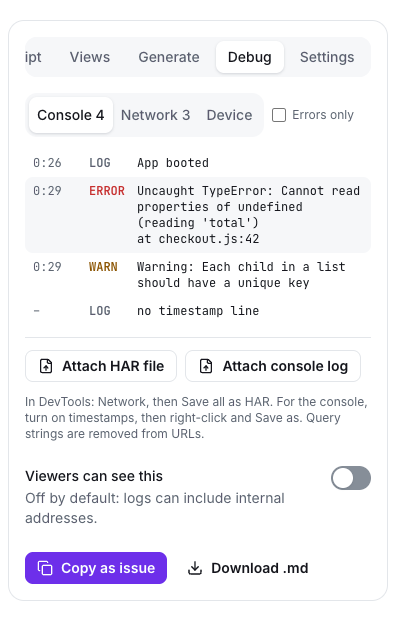
Record the bug once. The video, your browser and screen details, and the console and network logs you attach arrive in one link.
- Logs that line up with the video. Attach a DevTools network export (HAR) and a console log. Click a row to jump to that moment.
- The details people forget. Bug-report mode saves the browser, system and screen size with the recording.
- Safe to share. URLs are stripped of query strings. Debug details are hidden from viewers unless you turn them on.
- Straight into your tracker. Copy a ready-made issue, or open it in Linear or GitHub from the draft.
Privacy you can explain.
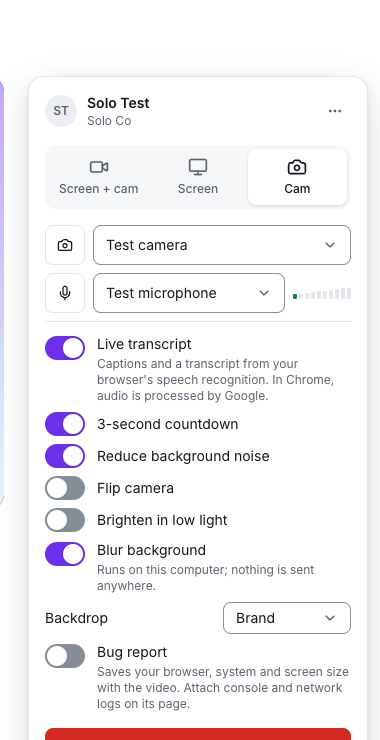
Every setting says what it does in plain words, so you can tell a customer, a lawyer or your team exactly who can see what.
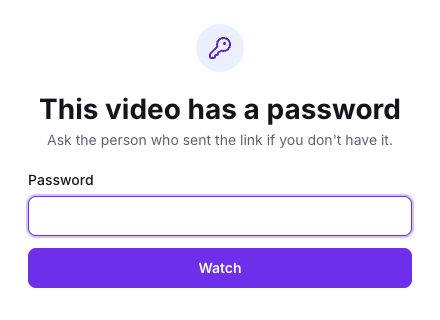
- Links that expire, per video or as a rule for the whole workspace.
- Passwords, and email gates that ask for or require an email.
- Three levels: anyone with the link, your workspace, or only the people you add.
- Background blur runs on your own computer. Nothing is sent anywhere.
Only creators pay.
Viewers join free.
Cancel in one click.
Export your data as CSV.
No seat fees for the people who only watch, comment and reply. Your videos, comments and insights stay yours.
See pricingStart free.
Compare plansFree
- 25 videos per person, up to 5 minutes each
- Comments, reactions and the viewer list
- Transcripts and captions
Pro
- Unlimited videos of any length
- Viewers join free
- Trim, folders, archive and a 30-day trash
- Hide our branding, upload video files, workspace insights